In today’s digital landscape, crafting high-quality content is just one piece of the puzzle. While comprehensive content can connect you with an audience, technical SEO ensures your message reaches them. Search engines work by crawling web pages and indexing them to rank them on SERPs.
Once a page is indexed, search engines like Google rank pages and sort through millions of pages to provide relevant results. This is why your website needs to be properly crawled and indexed. Implementing technical SEO parameters is crucial to improve your visibility on the internet. In this guide, I’ll break down the basics and best practices to implement technical SEO on your website.
What is Technical SEO?
Technical SEO focuses on optimizing a website’s infrastructure, including its speed, security, and other technical elements that impact its performance. These elements play a pivotal role in how users and search engines view your website. On-page SEO and off-page SEO are important to rank on SERPs. However, if your website is not optimized for technical SEO, your web pages won’t appear on AI or search engine results.
Why is Technical SEO Important?
Technical obstacles are the biggest challenges brands face with SEO for digital success. Technical SEO lays a solid foundation so that search engines can crawl, understand, and index your pages. Without the foundation, content won’t appear in search results, no matter how valuable the content is. Once your website structure and metadata are clear, it becomes easy to rank on both AI-driven and traditional search results.
Key Elements of Technical SEO
Technical SEO may seem daunting to users; however, it is not as technical as it sounds. Below is a technical SEO checklist to improve your rankings.
1. Website Crawlability
Crawling is the first step of providing visibility on AI and traditional search engines. In fact, if search engines are not able to crawl pages, then your content will never appear in search results. This is why your webpages must be crawlable, so let’s look at 4 factors that impact crawlability.
A) Internal Linking
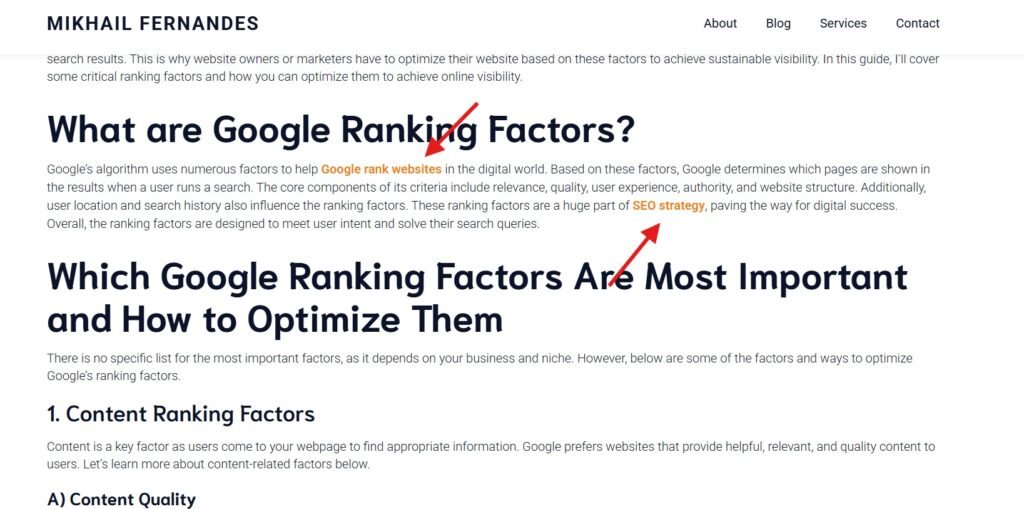
Search engines crawl pages by following links on pages they already know. This helps search bots find new content and better understand the relationship between these pages. Orphan pages without any links are difficult for crawlers to find. If you create a clear link hierarchy, you can point it to important pages so they get higher crawl equity.
B) XML Sitemap
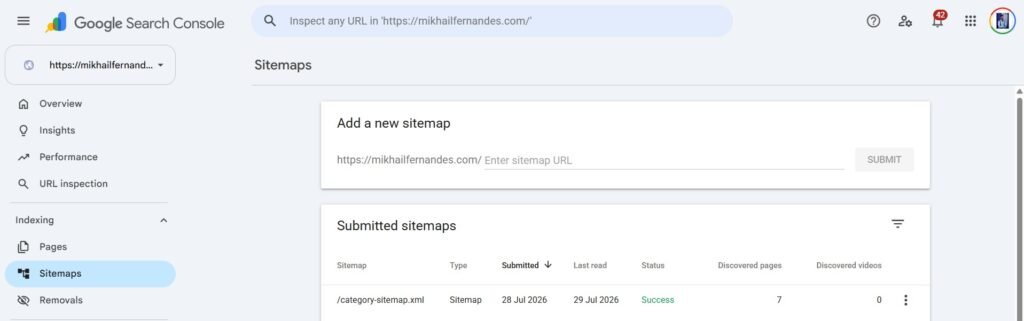
An XML sitemap is made of URLs from important pages on your site. This allows Google’s bots to crawl important pages and index them or update them if there are any changes. These sitemaps are essential if you have many pages or a large website, where internally linking every page can be challenging.
A sitemap is usually located in:
- yoursite.com/sitemap.xml
- yoursite.com/sitemap_index.xml
- SEO plugins on your WordPress dashboard
Once you find your sitemap, you can submit it to Google through Google Search Console.
C) Robots.txt
Robots.txt tells search engines where they can crawl and access your content. robots.txt is one of the most common crawlability issues faced by pages on the internet. If you want your pages to be indexed, you need to give Google access to them. You can locate your robots.txt file at yoursite.com/robots.txt.
D) JavaScript Rendering
If your website is designed or heavily dependent on JavaScript, content has to be rendered, as crawling is not enough. Google first crawls the HTML and then adds it to a render queue. Once the resources are available, Google’s Web Rendering Service (WRS) renders them as the world would see them. Ensure that you don’t hide critical content behind clicks or scrolls. For complex sites, use pre-rendering and server-side rendering so that search engines can access and index your content.
2. Website Indexation
Website indexing is the process by which search engines store content from crawled pages in their database. The index contains billions of webpages, which are displayed when the search query for an item is met. This is why pages need to be indexed before they appear in the SERPs. You can check if an individual page is indexed by adding its URL in Google Search Console.
There are a few things you need to ensure Google doesn’t have a problem indexing web pages. This includes
A) Noindex Directives
A noindex tag provides Google and search engines with directives to keep a certain page from being indexed. You need to carefully place this tag when you want to exclude a particular page from getting indexed.
Some common pages to not index include:
- Admin and staging areas
- Thank you pages
- Internal results pages
- Login and registration pages
- Filtered URLs
- Thin or empty archives
B) Meta Robots Tags
Meta robots tags are HTML snippets placed in the head section of the webpage. It instructs search crawlers to control indexing and link equity of the page. Some common values you can include are “noindex” and “nofollow”. These values tell search engines not to index pages or not to follow a specific page.
C) Canonical Tags
Canonical tags inform search engines which URL is the preferred copy of a page when multiple URLs have similar or identical content. This helps prevent duplicate content issues with Google and ensures the right page is indexed and ranked.
3. User-Friendly Site Architecture
A well-structured website is essential to improve user experience and your site rankings. This helps search engines navigate across pages and boosts its usability to users. Let’s look into key aspects to consider:
A) Responsive Design
Responsive website design ensures that your website automatically adjusts its layout, content, and visuals on desktop, tablet, and mobile screens. Google prioritizes mobile versions of webpages due to the sheer number of searches done on them. This is why it uses mobile-first indexing to index and rank your website. If you have a responsive site, you don’t have to create separate versions for mobile devices.
B) Core Web Vitals
Core Web Vitals is a set of standards used by Google to measure loading performance, interactivity, and visual stability of a website. These metrics include:
- Largest Contentful Paint (LCP): It helps check your website’s loading performance.
- Interaction to Next Paint (INP): It checks the responsiveness of your website.
- Cumulative Layout Shift (CLS): It measures the visual stability of websites.
Optimizing these core features is essential as they directly influence how search engines discern your page’s user experience.
C) Page Load Speed
Page speed is a crucial ranking factor for both mobile and desktop devices. So, make sure to optimize it so your website loads quickly. Usually, pages that take longer to load have lower retention and higher bounce rates.
To improve your page load speed, you need to focus on
- Compressing files and images
- Minimizing HTTP requests, CSS, HTML, and JavaScript files
- Using a content distribution network (CDN) for better load times across the globe
If your website loads quickly, it satisfies users as well as allows search engines to crawl and index content efficiently.
C) Breadcrumb Navigation
Breadcrumb navigation is a text path that tells users where they are on the website. It is located at the top of the page and helps improve user navigation. Through its navigation, users can easily move back or go forward in the search. This navigation is very helpful if your website is large.
Breadcrumbs help search engines understand your page structure and study the relationship of your pages. They distribute link equity across your website, helping your website rank higher.
4. Security
Website security is a core pillar of technical SEO in the digital space. Without proper security protocols, your site may be flagged, and rankings may be affected. Search engines may not index pages that are compromised. This helps prevent cyber threats, ensuring a safe browsing environment.
HTTPS is a security parameter that protects your sensitive information, such as passwords, credit card details, and other confidential information. It helps build user trust and allows you to align your website to modern browser standards. Additionally, they signal a positive sign to AI systems to deliver the content.
You can check the lock sign in the URL and see if your website is secure. You need an SSL certificate if you want your site to have HTTPS security. Generally, a hosting provider offers an SSL certificate. Check out Hostinger if you want to avail a free SSL certificate. The platform has some of the best features, is affordable, and you can create a website in minutes.
5. URL Structure and Duplicate Content
Clean and descriptive URLs let search engines and users understand the context of a page. It drastically improves clicks on your page and enhances its accessibility. Additionally, if the URL follows a logical hierarchy, search engines can better understand your site’s categorization and relationships.
Duplicate content occurs when two pages on your website have similar content. This can make undesirable links rank in SERPs and waste your crawl budget.
6. Structured Data
Structured data or schema markup helps search engines understand your page’s content better. It is added to your page’s HTML, so your content is shown when relevant search terms are found. When you add the right structured data, your pages can get rich snippets. These snippets appear below your title and description, which makes your pages stand out. This can improve your clicks and allow search engines to understand what a page is about. However, if the schema markup doesn’t match what users see, search engines may ignore it. Therefore, it is important to craft accurate structured data that matches the content on the page.
7. Fix Broken Pages
Broken pages with a 404 error code can have a negative user experience and waste crawl budget. If users encounter the error, they will leave the site and increase its bounce rate.
To fix the broken pages
- Fix and reinstate pages that you accidentally deleted.
- Redirect old pages to relevant pages on your site.
- Remove internal links that point to non-existent or deleted pages.
Stay On Top of Technical SEO Issues
Technical SEO is a complex process, and you cannot fix everything at once. It is good to start with the fundamentals that cover crawlability and indexation, followed by security and mobile experience. These core fundamentals can help grow your website and be cited in search engines and AI-generated answers.
New problems may pop up every time your website grows or you make changes. This is why you need to monitor the pages regularly. SurferSEO is a premium SEO tool that allows you to audit your technical SEO and rank on SERPs. If you still need more help, then you can get in touch with me. I can enhance your website content as well as technical aspects to help it scale and rank on the internet.
One response
[…] Technical SEO is the backbone of your website, and AI doesn’t remove it. Google needs to crawl and access your pages to understand your website. If technical issues exist, your site won’t rank in SERPs or AI overviews. […]